Alfie Kohn - Encouraging Collaboration rather than Competition
Education Next is a free online conference that brought together a range of leaders in thinking and pedagogy. Below are key notes from Alfie Kohn's presentation around the concept of collaboration and schooling.
- Reflective Rebels
- Creating their own questions as educators, rather than imposed curriculum
- Powerful, responsive and thinking learning vs passive learning
- Starting with questions, problems and projects vs facts, skills and separate disciplines
- Students involved in curriculum
- Empowering kids to look at institutional changes and looking at changing structures, rather than acquiring skills and fitting in to norm
- Fixing the kids to fit the system e.g. skills to fit the system and navigate it
- Challenging and changing
- Asking questions about the system itself, the system and what changes need to be made
- Navigating away from a 'fact based' curriculum
- Responsive to needs vs planned pathways and 'canned' ways of 'managing'
- Punish/reward = control
- Who are your networks/colleagues/relationships that will support rebellious thought and reflect on research/concepts/thinking to make shifts in practice that are student central
Showing posts with label conferences. Show all posts
Showing posts with label conferences. Show all posts
Monday, August 15, 2016

Wednesday, July 29, 2015
Key Competencies for the Future
Key Competencies for the Future was release mid 2014 and explores the history, idealogy and understandings of New Zealand's Key Competencies. The authors; Rosemary Hipkins, Rachel Bolstad, Sally Boyd and Sue McDowall look at the Key Competencies from many angles and examine the important place that they have within our curriculum.
Right from the start of this book there were key elements and statements that stood out to me that really highlighted the importance of the Competencies for teachers. Particularly of interest was the concept of how even though the Competencies stand alone, they have to stand together. You cannot also look at them in isolation and piecing the picture together of how they fit and work together in the wider world is key to us as educators supporting our students with them.
"Key Competencies are actually cross-cutting of each other. We pull them apart to understand their individual character, but it's also important to stitch them back together when we put them to work in real contexts" - KCFTF (Key Competencies for the Future) Pg 16
I've really enjoyed following the VLN thread and webinar that happened as part of the Connected Educator Month - you can watch the webinar with 3 of the authors here. It's worth the watch and listen, even if you aren't currently reading the book.
There are such a wide range of concepts that stood out to me personally and for my practice and I particularly enjoyed the thinking around 'wicked problems'.
Wicked Problems: the idea of students being involved in real future focused problems that have relevancy and impact for their world. Concepts such as food security, sustainability, pollution and more. These are large scale problems that are difficult or impossible for people to solve due to a number of reasons, such as perspectives, scale etc. Read more on Wicked Problems here. Through this I was questioning how really future focussed our practice and selection of negotiated learning avenues have really been? Are they big enough with far reaching consequences that surpass the students' time in school. At uLearn I have had the opportunity to attend workshops run by Tom Barrett of NoTosh - in these workshops I have begun to explore Design Thinking further. Many comments and conversations with my colleagues during this workshop filtered back to themes and ideas from the Key Competencies for the Future book. Particularly around Wicked Problems, provocations and the design thinking journey.
Right from the start of this book there were key elements and statements that stood out to me that really highlighted the importance of the Competencies for teachers. Particularly of interest was the concept of how even though the Competencies stand alone, they have to stand together. You cannot also look at them in isolation and piecing the picture together of how they fit and work together in the wider world is key to us as educators supporting our students with them.
"Key Competencies are actually cross-cutting of each other. We pull them apart to understand their individual character, but it's also important to stitch them back together when we put them to work in real contexts" - KCFTF (Key Competencies for the Future) Pg 16
I've really enjoyed following the VLN thread and webinar that happened as part of the Connected Educator Month - you can watch the webinar with 3 of the authors here. It's worth the watch and listen, even if you aren't currently reading the book.
There are such a wide range of concepts that stood out to me personally and for my practice and I particularly enjoyed the thinking around 'wicked problems'.
Wicked Problems: the idea of students being involved in real future focused problems that have relevancy and impact for their world. Concepts such as food security, sustainability, pollution and more. These are large scale problems that are difficult or impossible for people to solve due to a number of reasons, such as perspectives, scale etc. Read more on Wicked Problems here. Through this I was questioning how really future focussed our practice and selection of negotiated learning avenues have really been? Are they big enough with far reaching consequences that surpass the students' time in school. At uLearn I have had the opportunity to attend workshops run by Tom Barrett of NoTosh - in these workshops I have begun to explore Design Thinking further. Many comments and conversations with my colleagues during this workshop filtered back to themes and ideas from the Key Competencies for the Future book. Particularly around Wicked Problems, provocations and the design thinking journey.
Thursday, May 8, 2014
BYOD in the Classroom
At the BYOD day in the holidays I had the pleasure of presenting with my colleague Jessicca Vidal on BYOD in the Classroom.
During the session we shared the organisation of our classrooms and where the design for our classrooms comes from. We then shared how to support students with BYOD, why we choose particular tools and how to get underway with BYOD in the classroom. During the final part of our presentation we shared some examples of different tools we use to support learning.
During the session we shared the organisation of our classrooms and where the design for our classrooms comes from. We then shared how to support students with BYOD, why we choose particular tools and how to get underway with BYOD in the classroom. During the final part of our presentation we shared some examples of different tools we use to support learning.
Monday, April 21, 2014
BYOD 2014 - Making it Mobile
Thursday 1st May sees the second BYOD conference happening in Auckland; BYOD 2104 - Making it Mobile. The conference is run by Learning Network and is a great opportunity to take part in a range of PD around bring your own devices (BYOD).
I have the opportunity to present at the very first conference last year at Albany Senior High, where I ran 2 sessions. A session on Evernote and another on Self Management and BYOD. The day was packed with loads of people attending and a great selection of presenters.
BYOD 2014 is no different from last year, with a huge assortment of amazing presenters sharing their knowledge with you. A hugely inspirational line up that includes some of my favourite twitterers and bloggers: Helen King, Allanah King, Dorothy Burt, Fiona Grant, Barbara Reid, JJ Purton Jones, Stephen Lethbridge, Luke Sumich, and more. There is a huge selection of strands that suit everyone from the classroom teacher through to principals. Summerland Primary also has 3 other presenters which are worth a looksie - Innes Nisbet is our music specialist, Janet Shepherd is our art specialist and Luke Sumich our principal are all presenting as well.
This year I am presenting with my colleague Jessicca Vidal, who I presented with at uLearn 2013. An amazing year 3/4 classroom teacher who has a lot of amazing teaching and learning happening with her students. We will be presenting about how we utilise BYOD in our classrooms and some of the tools we are using to help students understand the tools that they have available to them and to become more self-managing with their devices.
Click here to find out more about BYOD 2014 - Making it Mobile
I have the opportunity to present at the very first conference last year at Albany Senior High, where I ran 2 sessions. A session on Evernote and another on Self Management and BYOD. The day was packed with loads of people attending and a great selection of presenters.
BYOD 2014 is no different from last year, with a huge assortment of amazing presenters sharing their knowledge with you. A hugely inspirational line up that includes some of my favourite twitterers and bloggers: Helen King, Allanah King, Dorothy Burt, Fiona Grant, Barbara Reid, JJ Purton Jones, Stephen Lethbridge, Luke Sumich, and more. There is a huge selection of strands that suit everyone from the classroom teacher through to principals. Summerland Primary also has 3 other presenters which are worth a looksie - Innes Nisbet is our music specialist, Janet Shepherd is our art specialist and Luke Sumich our principal are all presenting as well.
This year I am presenting with my colleague Jessicca Vidal, who I presented with at uLearn 2013. An amazing year 3/4 classroom teacher who has a lot of amazing teaching and learning happening with her students. We will be presenting about how we utilise BYOD in our classrooms and some of the tools we are using to help students understand the tools that they have available to them and to become more self-managing with their devices.
Click here to find out more about BYOD 2014 - Making it Mobile
Thursday, May 2, 2013
Wednesday, October 17, 2012
GAFE Summit 2012

During the holidays I had the opportunity to attend the Google Education Summit at Albany High School. It was the first GAFE held in New Zealand and it was an awesome day of sharing and learning. Albany High is an impressive school - that boasts amazing open learning spaces.
First session up I attended a session with Lenva Shearing looking at Teacher Dashboard created by Hapara. It's an add on for Google Apps that allows you to manage your Google Apps environment easily. Through the system it allows you to see work that students have completed and when. It also allows for ease of accessing documents as the teacher rather than students having to share items or move things around. There are some great features that help with the use of google docs such as the roll over feature - where you roll your mouse over an item to see a quick thumbnail of the document. Simple by effective tools that help streamline the management of multiple documents in the classroom.
As part of the process Hapara help with set up - organising folders and more how you want them ready for your roll out. The process allows for this to happen for one class or a whole school. To find out more check out their website here.
Session 2 was the presentation of Helen King, an amazing teacher from Pt England School who uses movie making among other tools as strong hooks for her learners. You can see examples of students work through their class blog PESKings. It was awesome to see her passion for teaching and her students as she talked about her students and what they did in their class on a daily basis. I was interested in hearing about the philosophy and ideas around their CyberSmart programme and the different elements that are contained inside this. I always love the chance to explore other teachers classrooms and hear or talk to them about the things happening inside them. It was an awesome opportunity to hear about daily life in Helen's class.
In session 3 we geared up with Google to look at training opportunities that Google presents to teachers and educators around the world. We had a chance to talk to Wendy Gorton about resources, the Google Teacher Academy and more. A highlight was finding out more about the Google Apps Training Centre where you can go through a series of online modules to become a Google whizz - would definitely help develop key knowledge around Google Apps and it's potential. Another highlight was the Google Search Curriculum which provides opportunities for educators and students to learn more tips and tricks to become better researchers on the web.
The final session of the day was with Chris Bell looking at 25+ ways to use Google for blended and online learning. A couple of my takeaways from this session was the snapshot button in Google Docs which allows you to insert images straight from your webcam. Also the youtube editor which allows you to be able to record straight to youtube and then use the online editor to edit the video to be finished all online. Also the youtube Schools site that is underway. A great tool that I'm keen have a go with the students - easily created, remixed and published online for sharing.
The day was also filled with lots of other great moments. Presentations, Google Smackdown and the conversations with the amazing people that were at the day. The general consensus was that it should definitely return on a yearly basis.
Monday, October 8, 2012
Hashtags & Conferences

Both provide a great opportunity to learn new things even if you aren't at the conference.
"How?" You say...
Easily through Twitter.
Each of these upcoming conferences have a hashtag that people will use when sending out a tweet. You can easily follow the tweets this way, whether you are at the conference or not and whether you are on twitter or not.
A hashtag (#) acts like a collection agent - allowing people to group together tweets on a similar topic or subject so they can easily be collated on the internet.
Here's how it works...
The wonderful people of twitter who are at the conference taking part in keynotes, presentations or marvellous conversations will hopefully add a hashtag to their tweet.
Here is a tweet that I sent with the hashtag #GAFENZ

This tweet will then be picked up in hashtag searches when looking for the hashtag #GAFENZ.
Here are links to help you follow the tweets from both of the conferences:
The Google Apps Summit on Tuesday has the hashtag #GAFENZ or #GAFESUMMIT
#Gafesummit - You can follow the tweets that are posted here on tweetchat.
#Gafenz - You can follow the tweets that are posted here on Twitter or here on Tweetchat
ULearn is using the hashtag #ULEARN12
You can follow the tweets that are posted here on Twitter or here on Tweetchat
On tweetchat you can search for a particular hashtag and it will group them for you together so you can easily read through the tweets being sent. You don't need to sign up to use the site, but this is an option. You can also change the speed that you would like it to check for new tweets - just click on the 'refresh speed' at the top of the page. This is great for when there are a lot of tweets happening - it allows you to work through the tweets without them refreshing too fast!
So whether you are at the conference or not you can keep up with the conversations, ideas, links and more that will be coming from the conferences. If you are feeling a bit bold - you might even sign yourself up for twitter and join in the conversation! Just remember to use the hashtag in your tweet so we can join you!
Image used under Creative Commons: Shovelling Son
Wednesday, August 8, 2012
Conversations and Collaborations
Educamps.
A fairly common word now in New Zealand education, but one that doesn't lose any of it's stamina as the years go by. This year saw my 5th year of attending Educamps and I love them. It's such an awesome chance to catch up with amazing tweeps, bloggers and educators from around New Zealand.
 Christchurch - Burnside High
This year I travelled to Christchurch for their first educamp run by Pauline and Anne. It was great to be surrounded by a new set of faces and people. They are such strong educators who have been pushing through some pretty hard times. It was hard to be in the centre of town and see the devastation that has occurred in Christchurch. Being there was so much more than seeing it on the nightly news. But the educators that were in the room were passionate, keen and had a great sense of humour. The conversations that went on ranged from BYOD, Daily 5 through to iPads and mobile technologies. It was great to finally get to meet awesome edutweeps like Judykmck who has helped me a lot with Daily 5/CAFE understanding and ideas through her sharing. Paulinehendog and many others! I had the chance to take along a educamp newbie from Christchurch Aimee and converted her to the educamp way. She's already looked to sign up her husband and a few others for padcamp in a few weeks time! Find out more and see some more pics about eduCamp Chch here in a post from Anne.
Auckland - Stonefields School
I arrived a bit late and educamp was in full swing. A packed room, in fact so packed that the participants were listening from the outside of the room. It started with a full on smackdown with a list of people to share that got bigger as people were standing up to present. From here we broke off into each of the different areas. It was nice to have a chance to have a look around Stonefields and see a new school. Some nice spaces and areas and a fabulous play area for the kids. We had a great bounce on the bouncey floor in the playground at the end of the day (who said they were made for kids!)
There was another huge array of conversations of offer in Auckland. BYOD, iPads, Daily 5, Minecraft... just to name a small array of topics. For more information check out the shared Google Doc that gets created at each eduCamp to help capture the day.
I had the chance to be involved in another great round of discussion about Daily 5 and CAFE with a bunch of teachers who are already using it and those that are keen to use it. It was great to talk to some other teachers who had been implementing it in their class and look at how they adapt and change elements to work for them. This year Daily 5 has unfolded into different parts in my class and the CAFE element has as well. I've been able to pick the best of the best from last year and am using it to suit the students I have in front of me. One of the great things I love about the management and set up of Daily 5.
The day was another great chance to network and catch up with another round of fabulous bloggers and edutweeps. I had a chance to meet some new ones too and form some new twitter connections. One of the best things about this day is the people. There is something powerful about being in a room full of passionate and keen educators and being a part of those conversations. So, if you are interested... or just curious... check out the educamp wiki to see when the next one near you is happening!
Long live Educamps!

A fairly common word now in New Zealand education, but one that doesn't lose any of it's stamina as the years go by. This year saw my 5th year of attending Educamps and I love them. It's such an awesome chance to catch up with amazing tweeps, bloggers and educators from around New Zealand.

This year I travelled to Christchurch for their first educamp run by Pauline and Anne. It was great to be surrounded by a new set of faces and people. They are such strong educators who have been pushing through some pretty hard times. It was hard to be in the centre of town and see the devastation that has occurred in Christchurch. Being there was so much more than seeing it on the nightly news. But the educators that were in the room were passionate, keen and had a great sense of humour. The conversations that went on ranged from BYOD, Daily 5 through to iPads and mobile technologies. It was great to finally get to meet awesome edutweeps like Judykmck who has helped me a lot with Daily 5/CAFE understanding and ideas through her sharing. Paulinehendog and many others! I had the chance to take along a educamp newbie from Christchurch Aimee and converted her to the educamp way. She's already looked to sign up her husband and a few others for padcamp in a few weeks time! Find out more and see some more pics about eduCamp Chch here in a post from Anne.
Auckland - Stonefields School
I arrived a bit late and educamp was in full swing. A packed room, in fact so packed that the participants were listening from the outside of the room. It started with a full on smackdown with a list of people to share that got bigger as people were standing up to present. From here we broke off into each of the different areas. It was nice to have a chance to have a look around Stonefields and see a new school. Some nice spaces and areas and a fabulous play area for the kids. We had a great bounce on the bouncey floor in the playground at the end of the day (who said they were made for kids!)
There was another huge array of conversations of offer in Auckland. BYOD, iPads, Daily 5, Minecraft... just to name a small array of topics. For more information check out the shared Google Doc that gets created at each eduCamp to help capture the day.
I had the chance to be involved in another great round of discussion about Daily 5 and CAFE with a bunch of teachers who are already using it and those that are keen to use it. It was great to talk to some other teachers who had been implementing it in their class and look at how they adapt and change elements to work for them. This year Daily 5 has unfolded into different parts in my class and the CAFE element has as well. I've been able to pick the best of the best from last year and am using it to suit the students I have in front of me. One of the great things I love about the management and set up of Daily 5.
The day was another great chance to network and catch up with another round of fabulous bloggers and edutweeps. I had a chance to meet some new ones too and form some new twitter connections. One of the best things about this day is the people. There is something powerful about being in a room full of passionate and keen educators and being a part of those conversations. So, if you are interested... or just curious... check out the educamp wiki to see when the next one near you is happening!
Long live Educamps!

Just a couple of the reasons I go to eduCamp - amazing educators!
Friday, July 20, 2012
EduCamp Akl - 21st July
Tomorrow - or today - depending when you are reading this is EduCamp Auckland 2012. If it is Saturday the 21st July and you are reading this... it is not too late!
This is the 5th year of EduCamp Auckland and having attended from the start I can honestly say that every year exceeds the year before. More people attend, meaning more conversations and connections are created. Whether you can come for the whole day or just an hour... I promise you will meet some like minded people and learn something fantastic!
Head down to Stonefields School in Mt Wellington to join in with EduCamp. It's a unique and vibrant unconference - where nothing is set in timetables and the conference is connected and created by the participants on the day. It's a tremendous day of conversations, connections and learning.
So - come meet and make connections with some like minded, passionate and inspiring people.
Stonefields School
10am - 3pm
To find out more information click here for the EduCamp Wikispace.
This is the 5th year of EduCamp Auckland and having attended from the start I can honestly say that every year exceeds the year before. More people attend, meaning more conversations and connections are created. Whether you can come for the whole day or just an hour... I promise you will meet some like minded people and learn something fantastic!
Head down to Stonefields School in Mt Wellington to join in with EduCamp. It's a unique and vibrant unconference - where nothing is set in timetables and the conference is connected and created by the participants on the day. It's a tremendous day of conversations, connections and learning.
So - come meet and make connections with some like minded, passionate and inspiring people.
Stonefields School
10am - 3pm
To find out more information click here for the EduCamp Wikispace.
Thursday, November 17, 2011
Retelling a Fairy Tale
This afternoon our school (Summerland) ran some iPad workshops at The Learning Network in West Auckland. There was a fantastic group that was a full house of 80 people, all ready to share and listen to what we have been doing this year. Our principal, Luke Sumich, started the session off with some really thoughtful words... what are you doing with these iPads and why? Where are you going with making sure that learning and your learners are at the heart of what you are doing? From there we broke off into 4 sessions. We offered an Art session using Art Rage and Live sketch, Storytelling, Apps for Numeracy, Tools for Teachers and a retelling workshop, which I ran.
Retelling using Draw Free and Puppet Pals
This session was based around the reading strategy called 'Retelling'. This is one of the CAFE strategies that we have worked on in our class. The students spent time reading a fairy tale then using the 'Retell Rope' and chart to retell their story to their partner. A 'Retell Rope' is a rope that has 8 knots down it - one for each area that they need to include in their retell. It provides a kinesthetic hook for them to hang their retelling information on.


https://docs.google.com/open?id=0B_I4f6vGYHk5ODdhNzc5NTktNjA2NC00MjZjLTlhYTUtYWZmNTEwYjgyYjg1
Retelling using Draw Free and Puppet Pals
This session was based around the reading strategy called 'Retelling'. This is one of the CAFE strategies that we have worked on in our class. The students spent time reading a fairy tale then using the 'Retell Rope' and chart to retell their story to their partner. A 'Retell Rope' is a rope that has 8 knots down it - one for each area that they need to include in their retell. It provides a kinesthetic hook for them to hang their retelling information on.
From here we moved into using the iPads to retell their fairy tale. Over 2 sessions the students were in groups of 2-4 students, they decided on the fairy tale they wanted to retell. From there the students decided the characters or items they needed to draw and they created these in Draw Free. The important thing here is that each character is saved to the photo album, so that Puppet Pals is able to access the image. Once the students completed their character drawings they would head into Puppet Pals and get ready to record. It's rather easy to import the characters into Puppet Pals through the 'Add Actors' button on the Actors page. The important thing to note here is that if you have the free version it will allow you to import it but then you won't be able to use it! So if you want to be able to import your own photos or pictures you need to make sure you have the directors pass. But it's definitely worth the $4.19 you will pay for the app!
The students select their actors and background and it brings you to the 'stage'. Here you will have a white rectangle in the middle with your characters and background. Everything that is inside the white rectangle is what will be recorded, so it's important to remember that if you have an actor outside the white box they won't be in your final video! Once you are ready to go you can press the red circle to record - on the newer version it lets you pause your recording which is handy. But the kids basically have 1 take to complete the recording - tough but handy from a teaching perspective as the kids tend to not keeping going back and touching up little things; it sets the bar high!

While recording the students can move their characters around inside the white box and speak. The movement and audio will all be recorded!
Once the kids have recorded you can then save and export them. Once you have tapped 'export' in Puppet Pals it will export it into your Photo Album. If you don't do this, you will only be able to watch your movie inside the Puppet Pals app. When it let's you know that it's exported you can easily plug it into your computer and download it to your computer through iPhoto. Check out my students very first Puppet Pal retellings on our class blog here!
There are many different ways that you could use Puppet Pals.
Some of the ways you could use it are:
- Students that didn't want to speak in front of the class - take a photo, add the student into Puppet Pals and get them to talk
- Sharing their learning - what did I learn, numeracy strategies, reading strategies etc
- End of topic to explain their learning and knowledge from the topic
- Photos from trips as backgrounds and students can recount events that happened on the trip
There are so many ways you could use it!
The following link (click here or on the photo) will take you to a how to sheet that you are welcome to download and use in your classroom to help you get on your way. Link back to any work you complete or ideas you have and leave a comment to let us know how you get on!
Thursday, October 20, 2011
Wednesday, October 19, 2011
Saturday, July 30, 2011
eWrapper Conference
On the last day of the holidays I had the pleasure of attending the eWrapper Mini Conference at Everglade School in Manukau. I was even more excited to have been asked to present a workshop by Rachel Boyd. The choice for the workshops were huge! It was really hard picking workshops which ranged in topics from thinking, green screening, mobile devices, questioning and more!
The day started with a keynote presentation by Trevor Bond based on the notion that there shouldn't be such a huge focus on Inquiry models but rather more of a focus on the learner and their needs. This looked like a fantastic keynote but unfortunately I wasn't able to be there for the whole keynote. Hopefully I'll get a chance to see this at a later date.
I was fortunate however to be able to attend Trevor's Questioning workshop later in the day. This has been a big focus for me this year and he definitely threw a few spanners into the work and made us think and question what we are doing. One of the quotes that he worked through was a quote by Edward De Bono - "Questioning is the engine-house of thinking." He then worked through the notion that as teachers we shouldn't be so focussed on the 'fat' and 'skinny' questions but rather look at how student's questioning skills can be developed to be more specific and focussed. He argued that sometime there is a high need for 'skinny' questions that prove them to be more than effective in gaining the information they require. One of the participants referred back to "what every good marketer would know" that the use of a skinny 'screening question' is highly effective to find out if the person they are talking to fits their requirements.
A good question is one that:
- is relevant
- gets you the information you need
- can be taken from intelligent and non-intelligent sources
(Intelligent being people / non-intelligent being books, internet etc)
The idea of modelling to the students as questioners is a huge concept also. What kinds of questions are we demonstrating to our students?
Something that really hit home from me and that I took from this workshop was the notion of what do we do with those questions that kids ask? The on topic questions? The random questions? The ones that we just can't answer right now? I've always loved the idea of a wondering wall but then for me it's been the next step. How do we answer these and really acknowledge that we appreciate and accept a range of questions that will develop our student's knowledge? I've done a lot of thinking about this in the last day and I have a few ideas about how this could work in class. So keep tuned to see where this goes. I think this was my BIG takeaway from the day. If you want to find out more about Trevor Bond head along to his website at ICTNZ.
I also went to a workshop looking at how the Key Competencies were being developed at Reremoana School. There were some great ideas and really interesting to see how they had created their own Learning Competencies based on school and community feedback. They had fantastic use of Learning Journals in their math's programme to set goals, question and reflect on their own learning. There is more information about this on Lisa's Weebly.

Photo used under CC via Flickr: dullhunk
The day started with a keynote presentation by Trevor Bond based on the notion that there shouldn't be such a huge focus on Inquiry models but rather more of a focus on the learner and their needs. This looked like a fantastic keynote but unfortunately I wasn't able to be there for the whole keynote. Hopefully I'll get a chance to see this at a later date.
I was fortunate however to be able to attend Trevor's Questioning workshop later in the day. This has been a big focus for me this year and he definitely threw a few spanners into the work and made us think and question what we are doing. One of the quotes that he worked through was a quote by Edward De Bono - "Questioning is the engine-house of thinking." He then worked through the notion that as teachers we shouldn't be so focussed on the 'fat' and 'skinny' questions but rather look at how student's questioning skills can be developed to be more specific and focussed. He argued that sometime there is a high need for 'skinny' questions that prove them to be more than effective in gaining the information they require. One of the participants referred back to "what every good marketer would know" that the use of a skinny 'screening question' is highly effective to find out if the person they are talking to fits their requirements.
A good question is one that:
- is relevant
- gets you the information you need
- can be taken from intelligent and non-intelligent sources
(Intelligent being people / non-intelligent being books, internet etc)
The idea of modelling to the students as questioners is a huge concept also. What kinds of questions are we demonstrating to our students?
Something that really hit home from me and that I took from this workshop was the notion of what do we do with those questions that kids ask? The on topic questions? The random questions? The ones that we just can't answer right now? I've always loved the idea of a wondering wall but then for me it's been the next step. How do we answer these and really acknowledge that we appreciate and accept a range of questions that will develop our student's knowledge? I've done a lot of thinking about this in the last day and I have a few ideas about how this could work in class. So keep tuned to see where this goes. I think this was my BIG takeaway from the day. If you want to find out more about Trevor Bond head along to his website at ICTNZ.
I also went to a workshop looking at how the Key Competencies were being developed at Reremoana School. There were some great ideas and really interesting to see how they had created their own Learning Competencies based on school and community feedback. They had fantastic use of Learning Journals in their math's programme to set goals, question and reflect on their own learning. There is more information about this on Lisa's Weebly.
Photo used under CC via Flickr: dullhunk
Saturday, July 24, 2010
EduCamp
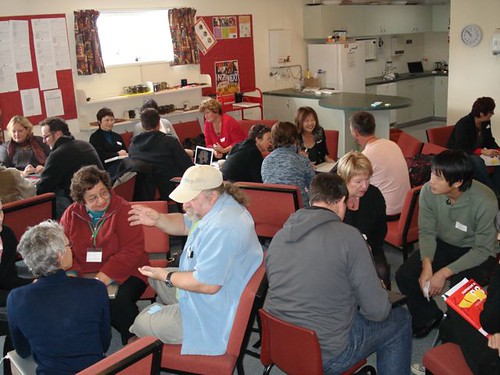
Summerland Primary hosted EduCamp 2010, which is an unconference styled day where participants who turn up decide on the content and direction of the day as it rolls through. It's an event that has been on my calendar for a while and it didn't fail to disappoint. The day was filled with lots of learning, collaborations, conversations and definite Aha! moments for all involved. It was great getting to meet more edutwitterers face 2 face and have some brilliant conversations.
The morning started with the Smackdown sessions - 3 minute presentations from a range of people all sharing tools, good practice and inspiration. Wallwisher provided a starting point to collate each of the ideas which people then stood up to talk about. As the Smackdown progressed more and more people participated in the sharing. A fantastic way to connect with people as it gave you a view of who was around and available to talk to on the day. Some amazing ideas were shared and the Wallwisher remains as a fantastic resource.
The day then broke up in to a range of sessions and workshops all decided on the day by the people who were there. There was a fantastic range of people across all the education sectors from Early Childhood to Tertiary, which is one of the reasons that EduCamp is such a fantastic day. No limits and No boundaries to who can be there and be involved! It was also great to see that there were many followers via the hashtag (#EduCampNZ) on Twitter.
Over the course of the day people had the chance to geocache, digistore, google, blog, wiki, RSS, discuss, share, collaborate on a range of tools and so much more. A group of junior teachers have established a wiki were they are going to share resources and ideas for the junior class.
A BIG thank you needs to go out to ACES and also Fiona Grant and Dorothy for organising and plotting a lot of the big ideas that got the day up and running.
Here's an AnswerGarden about the day that Cheesynz created!
The morning started with the Smackdown sessions - 3 minute presentations from a range of people all sharing tools, good practice and inspiration. Wallwisher provided a starting point to collate each of the ideas which people then stood up to talk about. As the Smackdown progressed more and more people participated in the sharing. A fantastic way to connect with people as it gave you a view of who was around and available to talk to on the day. Some amazing ideas were shared and the Wallwisher remains as a fantastic resource.
The day then broke up in to a range of sessions and workshops all decided on the day by the people who were there. There was a fantastic range of people across all the education sectors from Early Childhood to Tertiary, which is one of the reasons that EduCamp is such a fantastic day. No limits and No boundaries to who can be there and be involved! It was also great to see that there were many followers via the hashtag (#EduCampNZ) on Twitter.
Over the course of the day people had the chance to geocache, digistore, google, blog, wiki, RSS, discuss, share, collaborate on a range of tools and so much more. A group of junior teachers have established a wiki were they are going to share resources and ideas for the junior class.
A BIG thank you needs to go out to ACES and also Fiona Grant and Dorothy for organising and plotting a lot of the big ideas that got the day up and running.
Here's an AnswerGarden about the day that Cheesynz created!
Wednesday, July 21, 2010
Tuesday, July 13, 2010
Blogging: Basics & Beyond
The other presentation given as part of the ERA3 Conference in Brisbane. I had previously given a similar one at an Auckland conference but updated links, some of the slides and developed the content a bit further. The main focus of this presentation was aimed at people beginning blogging and to share some of the things that you need to think about prior to or when beginning a blog. It covers a range of topics from examples, content creation through to cybersafety and more.
All links in the presentation are available from here.
All links in the presentation are available from here.
Blogging final
View more presentations from hey.milly.
Wednesday, June 23, 2010
ERA3 Schools Tour - John Paul College
John Paul College is situated in Daisy Hill, Brisbane. An independent school that caters for K-12 students within a massive campus. At JPC the students from Year 4 work on 1:1 notebooks also. This was the final stop on our schools tour on Monday and what an amazing place to finish the day. Once again there seems to be a big movement in the Secondary sectors to move towards more flexible learning spaces. Some of the ideas and designs here were amazing and showed that the students were at the core of the decision process for the designs.
The main highlights for me at JPC were:
* The whiteboard tables and cupboard facings - flexible spaces for students to work and group work together.
* The Arc - An covered outdoor area with inbuilt speaker system into the roof.
* The primary classes that utilised the outdoor areas into the classroom spaces.
* The senior common library that had been organised by genre rather than author's last name. Also the library had a large percentage of front facing books. The librarian stated that they had had around an 80% uptake in borrowing since these 2 changes were made to the library.
* The senior common room's use of flexible learning spaces and a range of high/low learning areas. The use of portable screens that the students could hook their laptops up to for group work was a great idea as well.
These and more can be seen in the photo's below.
The main highlights for me at JPC were:
* The whiteboard tables and cupboard facings - flexible spaces for students to work and group work together.
* The Arc - An covered outdoor area with inbuilt speaker system into the roof.
* The primary classes that utilised the outdoor areas into the classroom spaces.
* The senior common library that had been organised by genre rather than author's last name. Also the library had a large percentage of front facing books. The librarian stated that they had had around an 80% uptake in borrowing since these 2 changes were made to the library.
* The senior common room's use of flexible learning spaces and a range of high/low learning areas. The use of portable screens that the students could hook their laptops up to for group work was a great idea as well.
These and more can be seen in the photo's below.
Tuesday, June 22, 2010
ERA3 Schools Tour - Brisbane Girls Grammar
As part of the ERA3 Conference there was a 1 day Schools Tour which took us through The Anglican Church Grammar School (or Churchies), Brisbane Girls Grammar and John Paul College. Below are the photo's from Brisbane Girls Grammar - I will post the JPC photo's tomorrow. Phenomenal schools with some amazing architecture and flexible learning spaces. It was really interesting getting around to some very different schools and seeing where secondary and primary learning spaces are heading in Australia. Click on the Brisbane Girls Grammar link here, to head to flickr to see more information about each photo. More from the schools tour to come!
Monday, May 17, 2010
EduCamp 2010
EduCamp 2010 is coming up - it's the must attend event for those with an interest in ICT in education! Saturday July the 24th at Summerland Primary School is EduCamp 2010 - a day where you can come share ideas and learn in an open space with a variety of people and educators.
EduCamp is based on Unconference and Open-Space meeting philosophies:
Speed Geeking at Unconference 2009
Image Courtesy of Fiona Grant

EduCamp is based on Unconference and Open-Space meeting philosophies:
- We are all learners AND teachers.
- The agenda is not set prior to event, those that attend are the right people and they will set the agenda on the day!
- There is no set time for events - they begin and end as they are needed.
- If you arrive at a session and it's not quite what you want, you are welcome to move on to another session! (The law of the feet!)
Speed Geeking at Unconference 2009
Image Courtesy of Fiona Grant
Subscribe to:
Posts (Atom)